# Hugo, Sessionize and a cron job: my blog setup
> How I moved from Hashnode to a bilingual Hugo blog, with talks pulled from Sessionize, automatic preview images and a daily deploy on GitHub Actions.
- Author: Luiz Schons
- Published: 2026-10-07
- URL: https://luizschons.com/posts/hugo-sessionize-cron-blog-setup/
- Português: https://luizschons.com/pt-br/posts/hugo-sessionize-cron-blog-setup.md
- Topics: Hugo, GitHub Actions
For a good while my blog lived on Hashnode, and it worked fine. The problem showed up when I started writing in both English and Portuguese: Hashnode has no real support for two languages, so I published every article twice, as if they were unrelated posts, with nothing linking one to the other.
I mentioned this to [Leo Cavalcante](https://leocavalcante.dev), and he introduced me to Hugo. Thank you, Leo: that conversation turned into the blog you are reading now.
Hugo gave me a lot more flexibility. In this post I walk through how I put it all together: the two languages, the talks page that updates itself, the automatically generated preview images, and the deploy that runs every day without me touching anything.
> **Updated on October 8, 2026:** since then I added the translated older articles, a language notice, topics, "Keep reading", comments and click tracking. It is all in the new sections below.
## One place for both languages
In Hugo, each article is a text file in the repository, and the translation is just another file next to it. Hugo understands that both are the same article: the English version lives at [luizschons.com](https://luizschons.com), the Portuguese one under `/pt-br/`, and each links to the other.
In practice, the articles folder looks like this:
```text
content/posts/
├── agent-observability-with-opentelemetry.md # English
├── agent-observability-with-opentelemetry.pt-br.md # Portuguese
├── hash-tables.md # English
└── tabelas-hash.pt-br.md # Portuguese
```
What links the two versions is the `translationKey` in the front matter, and in `hugo.toml` you only need to declare the languages:
```markdown
---
title: 'Agent Observability with OpenTelemetry'
date: 2026-09-16
series: ['AI-Friendly Architecture']
translationKey: agent-observability-with-opentelemetry
---
```
```toml
defaultContentLanguage = 'en'
[languages.en]
languageCode = 'en-us'
weight = 1
[languages."pt-br"]
languageCode = 'pt-br'
weight = 2
```
That solved what bothered me on Hashnode. One article, two versions, all in one place, and Google understands they are the same page in different languages. The look came from a theme called Hextra, which I kept adapting with my own layouts until it felt like mine.
The file names do not have to match: `hash-tables.md` and `tabelas-hash.pt-br.md` are the same article because they share the same `translationKey`. That way each language gets a URL that makes sense in it.
### A notice, not a redirect
Plenty of people land on the "wrong" version for them, from Google or from a shared link. I did not want to redirect anyone automatically, because that confuses Google and annoys people who prefer the other language. Instead, when a translation exists, a small notice shows up at the bottom: "This page is also available in English".
The notice only appears when the browser's preferred language, between Portuguese and English, is the other version's. If the visitor closes it or switches language from the menu, that is stored in the browser and it does not come back:
```javascript
var langs = navigator.languages.map(function (l) { return l.toLowerCase(); });
// the top preference between the two languages the site has
var top = langs.filter(function (l) { return l.startsWith('pt') || l.startsWith('en'); })[0] || '';
var wants = target === 'pt-br' ? top.startsWith('pt') : !top.startsWith('pt');
if (wants && !localStorage.getItem('langSuggestDismissed')) box.hidden = false;
```
## Bringing the old articles along
The articles that came from Hashnode had three problems. Many existed only in Portuguese. Their URLs ended with a hash, like `quicksort-33f8e917ab6c`. And code showed up as plain paragraphs, with no colors and manual line breaks.
**Translations with the original date.** Every article that only existed in Portuguese got an English version with the **same date** as the original. That way the translation lands in the right spot of the list, instead of looking like I published eleven articles in one day. Today every article exists in both languages.
**Clean URLs without breaking links.** Renaming a file changes its URL, and anyone with the old link (Google included) would hit a 404. For each old address there is a fixed page in `static/` that just redirects to the new one:
```html
```
Hugo has `aliases` in the front matter for this, but newer versions put the aliases of Portuguese pages under `/pt-br/`, while the old links lived at the root. Fixed pages do not depend on the Hugo version.
**Real code blocks.** The blocks that came in as `` with `
` became code blocks tagged with their language. Hugo then colors the code at build time, with no JavaScript, and the theme adds the copy button. I also gave every image a description (`alt`) and swapped the tables that were images for real tables, which now show up translated in the English version.
## Talks straight from Sessionize
All my talks and the events I have spoken at or organized were already on [Sessionize](https://sessionize.com/sschonss/). Keeping the same list on the blog would mean doing the work twice again, so the blog now reads the data from there.
Sessionize has a public API that returns the profile, the talks and the events as JSON. The [talks page](https://luizschons.com/speakers/) uses that JSON twice: when the site is built, and again in the browser of whoever opens the page. In practice, I add an event on Sessionize and a few minutes later it shows up on the blog, split into upcoming and past.
At build time, a script of a few lines saves the JSON into `data/`, where Hugo sees it as `site.Data.sessionize`:
```python
URL = "https://sessionize.com/api/speaker/json/2n3e2etaad"
OUTPUT = "data/sessionize.json"
request = urllib.request.Request(URL, headers={"User-Agent": "hugo-sessionize-sync/1.0"})
with urllib.request.urlopen(request, timeout=30) as response:
profile = json.load(response)
with open(OUTPUT, "w", encoding="utf-8") as file:
json.dump(profile, file, ensure_ascii=False, indent=2)
```
The template splits events by their end date, compared with the build day:
```go-html-template
{{- $today := time.AsTime (now.Format "2006-01-02") -}}
{{- range site.Data.sessionize.events -}}
{{- if ge (time.AsTime .eventEndDate).Unix $today.Unix -}}
{{- $upcoming = $upcoming | append . -}}
{{- else -}}
{{- $past = $past | append . -}}
{{- end -}}
{{- end -}}
```
In the browser, the same JSON is fetched again. Sessionize allows CORS, so a plain `fetch` is enough. If it fails, the page keeps the build version and shows a link to the profile:
```javascript
fetch('https://sessionize.com/api/speaker/json/2n3e2etaad')
.then(r => { if (!r.ok) throw new Error('HTTP ' + r.status); return r.json(); })
.then(render) // redraws events, talks, stats and photo
.catch(fail); // shows the notice with the profile link
```
The profile photo follows the same idea. It comes from Sessionize on the home page, on the talks page, in the site icon and in the preview images: change it there, it changes here.
And if Sessionize goes down? The page keeps showing the last saved version, with a link to my profile, and the photo falls back to a copy stored in the blog itself.
The photo fallback is plain HTML, so it works even before JavaScript loads:
```html
```
## Preview images that make themselves
When someone shares a link on LinkedIn or WhatsApp, the card image is what catches the eye. I did not want to open Canva for every new article, so Hugo generates that image itself.
While building the site, it draws one image per page, in both languages, with the article title, the series name when there is one, my photo and my name. I publish an article and the image comes with it. If I change my photo on Sessionize, every image picks up the new one on the next deploy.
This is the image the blog generated for the last article in the AI-Friendly Architecture series:

No external service, no headless browser: just Hugo's own image filters applied on top of a white background. The heart of the `og-image.html` partial is this:
```go-html-template
{{- $filters := slice
(images.Text $kicker (dict "font" $medium "size" 24 "color" "#64748b" "x" 80 "y" 62))
-}}
{{- range $i, $l := $lines -}}
{{- $filters = $filters | append
(images.Text $l (dict "font" $bold "size" $size "color" "#111827" "x" 78 "y" (add 110 (mul $i $lineHeight)))) -}}
{{- end -}}
{{- with resources.Get "images/profile.jpg" -}}
{{- $avatar := .Fill "96x96 Center q90" | images.Filter (images.Mask (resources.Get "og/avatar-mask.png")) -}}
{{- $filters = $filters | append (images.Overlay $avatar 80 502) -}}
{{- end -}}
{{- $img := resources.Get "og/base.png" | images.Filter $filters -}}
{{- return ($img | resources.Copy (printf "og/%s-%s.png" $page.Language.Lang (md5 $title))) -}}
```
The title is broken into lines beforehand (`$lines`), with the font size picked by its length. After that, the meta tags just point at the image:
```go-html-template
{{- with partialCached "og-image.html" . .RelPermalink }}
{{- end }}
```
## Topics, "Keep reading" and comments
Each article has a few topics in its front matter, like `tags: ['PHP', 'Performance']`, named in the file's language. Hugo builds a page per topic on its own ([PHP](https://luizschons.com/tags/php/), for example), and the topics show up as filters at the top of the [article list](https://luizschons.com/posts/).
At the end of each article, the "Keep reading" block suggests up to three similar articles. Hugo picks them itself with `.Related`, which scores what the articles have in common:
```toml
[related]
includeNewer = true
threshold = 20
[[related.indices]]
name = 'tags' # shared topics weigh the most
weight = 100
[[related.indices]]
name = 'series'
weight = 60
[[related.indices]]
name = 'date' # tiebreaker: articles from around the same time
weight = 5
```
```go-html-template
{{- with first 3 (site.RegularPages.Related . | complement (slice .)) }}
{{- range . }}{{ .Title }}{{ end }}
{{- end }}
```
Comments use [giscus](https://giscus.app), which stores each conversation as a Discussion in the blog's repository. No database, no ads, and all you need to comment is a GitHub account. The part I like the most: the English and Portuguese versions of an article share the same conversation, because the conversation is keyed by the `translationKey`, not by the URL:
```html
```
## The blog updates itself every day
The site is static and hosted on GitHub Pages. A GitHub Actions workflow builds and publishes it, and it runs in three situations: when I push, every morning, and when I click "Run workflow".
On every run it fetches the data from Sessionize, generates the icon and the preview images, builds the site with Hugo and publishes it. The daily run is what keeps talks and photo up to date, even in weeks when I write nothing. It also publishes scheduled articles: if I leave an article ready with a future date, Hugo ignores it until that day comes, and that morning's run puts it live.
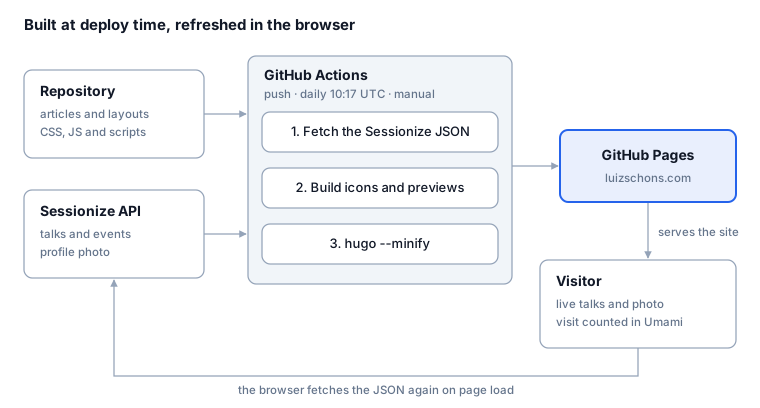
The whole workflow fits on one screen. The `cron` runs at 10:17 UTC (07:17 in Brasília), and every step that depends on Sessionize has an `|| echo` so it never takes the deploy down:
```yaml
on:
push:
branches: [main]
workflow_dispatch:
schedule:
- cron: '17 10 * * *'
permissions:
contents: read
pages: write
id-token: write
jobs:
deploy:
runs-on: ubuntu-latest
environment:
name: github-pages
steps:
- uses: actions/checkout@v4
with:
submodules: recursive # the Hextra theme is a submodule
- name: Refresh Sessionize data
run: python3 scripts/sync_sessionize.py || echo "using committed data"
- uses: actions/setup-python@v5
with:
python-version: '3.12'
- name: Build favicons and backup photo
run: |
pip install --quiet pillow
python3 scripts/build_favicons.py || echo "using committed icons"
- uses: peaceiris/actions-hugo@v3
with:
hugo-version: 'latest'
extended: true
- run: hugo --minify
- uses: actions/upload-pages-artifact@v3
with:
path: ./public
- uses: actions/deploy-pages@v4
```
Notice `contents: read`: the workflow only reads the repository and never writes to it.
A choice I am happy with: the workflow never commits to the repository. The Sessionize data is fetched at build time, so I could protect the `main` branch so that only I can push changes. If Sessionize fails along the way, the build carries on with the last saved version.
The protection is a ruleset on `main` with three rules (restrict updates, restrict deletions and block force pushes) and a single bypass: the repository admin role, which only I have. Since GitHub Actions cannot be an exception in a personal repository's ruleset, this setup only works because the workflow never needs to commit anything.
## Measuring without cookies
Today I write in one place, in both languages, and everything else takes care of itself: talks, photo, preview images, topics and deploy. I track visits with [Umami](https://umami.is), which does not use cookies and so needs no annoying consent banner.
The script is only included in the production build and only counts the real domain, so running `hugo server` locally does not skew the numbers:
```go-html-template
{{ if hugo.IsProduction }}
{{ end }}
```
Besides visits, Umami gets click events: talks and events opened, language switches, moving between articles and outbound links. A single file listens to clicks on the whole page and recognizes the kind of link. The call to Umami is guarded, because it may not have loaded or may be blocked, and measuring must never break the page:
```javascript
function track(name, props) {
try { if (window.umami) window.umami.track(name, props); } catch (e) {}
}
document.addEventListener('click', function (e) {
var a = e.target.closest('a[href]');
if (a && a.hostname !== location.hostname)
track('outbound', { host: a.hostname, from: location.pathname });
});
```
That tells me, for example, how many people switch language from the notice and which talks get the most clicks.
## Wrapping up
The code is open at [github.com/sschonss/meu-blog](https://github.com/sschonss/meu-blog), with a README explaining each part. If you also write in more than one language and are tired of publishing everything twice, take a look, and reach out on [LinkedIn](https://www.linkedin.com/in/luiz-schons/) if you want to chat.
 ```
## Preview images that make themselves
When someone shares a link on LinkedIn or WhatsApp, the card image is what catches the eye. I did not want to open Canva for every new article, so Hugo generates that image itself.
While building the site, it draws one image per page, in both languages, with the article title, the series name when there is one, my photo and my name. I publish an article and the image comes with it. If I change my photo on Sessionize, every image picks up the new one on the next deploy.
This is the image the blog generated for the last article in the AI-Friendly Architecture series:

No external service, no headless browser: just Hugo's own image filters applied on top of a white background. The heart of the `og-image.html` partial is this:
```go-html-template
{{- $filters := slice
(images.Text $kicker (dict "font" $medium "size" 24 "color" "#64748b" "x" 80 "y" 62))
-}}
{{- range $i, $l := $lines -}}
{{- $filters = $filters | append
(images.Text $l (dict "font" $bold "size" $size "color" "#111827" "x" 78 "y" (add 110 (mul $i $lineHeight)))) -}}
{{- end -}}
{{- with resources.Get "images/profile.jpg" -}}
{{- $avatar := .Fill "96x96 Center q90" | images.Filter (images.Mask (resources.Get "og/avatar-mask.png")) -}}
{{- $filters = $filters | append (images.Overlay $avatar 80 502) -}}
{{- end -}}
{{- $img := resources.Get "og/base.png" | images.Filter $filters -}}
{{- return ($img | resources.Copy (printf "og/%s-%s.png" $page.Language.Lang (md5 $title))) -}}
```
The title is broken into lines beforehand (`$lines`), with the font size picked by its length. After that, the meta tags just point at the image:
```go-html-template
{{- with partialCached "og-image.html" . .RelPermalink }}
{{- end }}
```
## Topics, "Keep reading" and comments
Each article has a few topics in its front matter, like `tags: ['PHP', 'Performance']`, named in the file's language. Hugo builds a page per topic on its own ([PHP](https://luizschons.com/tags/php/), for example), and the topics show up as filters at the top of the [article list](https://luizschons.com/posts/).
At the end of each article, the "Keep reading" block suggests up to three similar articles. Hugo picks them itself with `.Related`, which scores what the articles have in common:
```toml
[related]
includeNewer = true
threshold = 20
[[related.indices]]
name = 'tags' # shared topics weigh the most
weight = 100
[[related.indices]]
name = 'series'
weight = 60
[[related.indices]]
name = 'date' # tiebreaker: articles from around the same time
weight = 5
```
```go-html-template
{{- with first 3 (site.RegularPages.Related . | complement (slice .)) }}
{{- range . }}{{ .Title }}{{ end }}
{{- end }}
```
Comments use [giscus](https://giscus.app), which stores each conversation as a Discussion in the blog's repository. No database, no ads, and all you need to comment is a GitHub account. The part I like the most: the English and Portuguese versions of an article share the same conversation, because the conversation is keyed by the `translationKey`, not by the URL:
```html
```
## The blog updates itself every day
The site is static and hosted on GitHub Pages. A GitHub Actions workflow builds and publishes it, and it runs in three situations: when I push, every morning, and when I click "Run workflow".
On every run it fetches the data from Sessionize, generates the icon and the preview images, builds the site with Hugo and publishes it. The daily run is what keeps talks and photo up to date, even in weeks when I write nothing. It also publishes scheduled articles: if I leave an article ready with a future date, Hugo ignores it until that day comes, and that morning's run puts it live.

The whole workflow fits on one screen. The `cron` runs at 10:17 UTC (07:17 in Brasília), and every step that depends on Sessionize has an `|| echo` so it never takes the deploy down:
```yaml
on:
push:
branches: [main]
workflow_dispatch:
schedule:
- cron: '17 10 * * *'
permissions:
contents: read
pages: write
id-token: write
jobs:
deploy:
runs-on: ubuntu-latest
environment:
name: github-pages
steps:
- uses: actions/checkout@v4
with:
submodules: recursive # the Hextra theme is a submodule
- name: Refresh Sessionize data
run: python3 scripts/sync_sessionize.py || echo "using committed data"
- uses: actions/setup-python@v5
with:
python-version: '3.12'
- name: Build favicons and backup photo
run: |
pip install --quiet pillow
python3 scripts/build_favicons.py || echo "using committed icons"
- uses: peaceiris/actions-hugo@v3
with:
hugo-version: 'latest'
extended: true
- run: hugo --minify
- uses: actions/upload-pages-artifact@v3
with:
path: ./public
- uses: actions/deploy-pages@v4
```
Notice `contents: read`: the workflow only reads the repository and never writes to it.
A choice I am happy with: the workflow never commits to the repository. The Sessionize data is fetched at build time, so I could protect the `main` branch so that only I can push changes. If Sessionize fails along the way, the build carries on with the last saved version.
The protection is a ruleset on `main` with three rules (restrict updates, restrict deletions and block force pushes) and a single bypass: the repository admin role, which only I have. Since GitHub Actions cannot be an exception in a personal repository's ruleset, this setup only works because the workflow never needs to commit anything.
## Measuring without cookies
Today I write in one place, in both languages, and everything else takes care of itself: talks, photo, preview images, topics and deploy. I track visits with [Umami](https://umami.is), which does not use cookies and so needs no annoying consent banner.
The script is only included in the production build and only counts the real domain, so running `hugo server` locally does not skew the numbers:
```go-html-template
{{ if hugo.IsProduction }}
{{ end }}
```
Besides visits, Umami gets click events: talks and events opened, language switches, moving between articles and outbound links. A single file listens to clicks on the whole page and recognizes the kind of link. The call to Umami is guarded, because it may not have loaded or may be blocked, and measuring must never break the page:
```javascript
function track(name, props) {
try { if (window.umami) window.umami.track(name, props); } catch (e) {}
}
document.addEventListener('click', function (e) {
var a = e.target.closest('a[href]');
if (a && a.hostname !== location.hostname)
track('outbound', { host: a.hostname, from: location.pathname });
});
```
That tells me, for example, how many people switch language from the notice and which talks get the most clicks.
## Wrapping up
The code is open at [github.com/sschonss/meu-blog](https://github.com/sschonss/meu-blog), with a README explaining each part. If you also write in more than one language and are tired of publishing everything twice, take a look, and reach out on [LinkedIn](https://www.linkedin.com/in/luiz-schons/) if you want to chat.
```
## Preview images that make themselves
When someone shares a link on LinkedIn or WhatsApp, the card image is what catches the eye. I did not want to open Canva for every new article, so Hugo generates that image itself.
While building the site, it draws one image per page, in both languages, with the article title, the series name when there is one, my photo and my name. I publish an article and the image comes with it. If I change my photo on Sessionize, every image picks up the new one on the next deploy.
This is the image the blog generated for the last article in the AI-Friendly Architecture series:

No external service, no headless browser: just Hugo's own image filters applied on top of a white background. The heart of the `og-image.html` partial is this:
```go-html-template
{{- $filters := slice
(images.Text $kicker (dict "font" $medium "size" 24 "color" "#64748b" "x" 80 "y" 62))
-}}
{{- range $i, $l := $lines -}}
{{- $filters = $filters | append
(images.Text $l (dict "font" $bold "size" $size "color" "#111827" "x" 78 "y" (add 110 (mul $i $lineHeight)))) -}}
{{- end -}}
{{- with resources.Get "images/profile.jpg" -}}
{{- $avatar := .Fill "96x96 Center q90" | images.Filter (images.Mask (resources.Get "og/avatar-mask.png")) -}}
{{- $filters = $filters | append (images.Overlay $avatar 80 502) -}}
{{- end -}}
{{- $img := resources.Get "og/base.png" | images.Filter $filters -}}
{{- return ($img | resources.Copy (printf "og/%s-%s.png" $page.Language.Lang (md5 $title))) -}}
```
The title is broken into lines beforehand (`$lines`), with the font size picked by its length. After that, the meta tags just point at the image:
```go-html-template
{{- with partialCached "og-image.html" . .RelPermalink }}
{{- end }}
```
## Topics, "Keep reading" and comments
Each article has a few topics in its front matter, like `tags: ['PHP', 'Performance']`, named in the file's language. Hugo builds a page per topic on its own ([PHP](https://luizschons.com/tags/php/), for example), and the topics show up as filters at the top of the [article list](https://luizschons.com/posts/).
At the end of each article, the "Keep reading" block suggests up to three similar articles. Hugo picks them itself with `.Related`, which scores what the articles have in common:
```toml
[related]
includeNewer = true
threshold = 20
[[related.indices]]
name = 'tags' # shared topics weigh the most
weight = 100
[[related.indices]]
name = 'series'
weight = 60
[[related.indices]]
name = 'date' # tiebreaker: articles from around the same time
weight = 5
```
```go-html-template
{{- with first 3 (site.RegularPages.Related . | complement (slice .)) }}
{{- range . }}{{ .Title }}{{ end }}
{{- end }}
```
Comments use [giscus](https://giscus.app), which stores each conversation as a Discussion in the blog's repository. No database, no ads, and all you need to comment is a GitHub account. The part I like the most: the English and Portuguese versions of an article share the same conversation, because the conversation is keyed by the `translationKey`, not by the URL:
```html
```
## The blog updates itself every day
The site is static and hosted on GitHub Pages. A GitHub Actions workflow builds and publishes it, and it runs in three situations: when I push, every morning, and when I click "Run workflow".
On every run it fetches the data from Sessionize, generates the icon and the preview images, builds the site with Hugo and publishes it. The daily run is what keeps talks and photo up to date, even in weeks when I write nothing. It also publishes scheduled articles: if I leave an article ready with a future date, Hugo ignores it until that day comes, and that morning's run puts it live.

The whole workflow fits on one screen. The `cron` runs at 10:17 UTC (07:17 in Brasília), and every step that depends on Sessionize has an `|| echo` so it never takes the deploy down:
```yaml
on:
push:
branches: [main]
workflow_dispatch:
schedule:
- cron: '17 10 * * *'
permissions:
contents: read
pages: write
id-token: write
jobs:
deploy:
runs-on: ubuntu-latest
environment:
name: github-pages
steps:
- uses: actions/checkout@v4
with:
submodules: recursive # the Hextra theme is a submodule
- name: Refresh Sessionize data
run: python3 scripts/sync_sessionize.py || echo "using committed data"
- uses: actions/setup-python@v5
with:
python-version: '3.12'
- name: Build favicons and backup photo
run: |
pip install --quiet pillow
python3 scripts/build_favicons.py || echo "using committed icons"
- uses: peaceiris/actions-hugo@v3
with:
hugo-version: 'latest'
extended: true
- run: hugo --minify
- uses: actions/upload-pages-artifact@v3
with:
path: ./public
- uses: actions/deploy-pages@v4
```
Notice `contents: read`: the workflow only reads the repository and never writes to it.
A choice I am happy with: the workflow never commits to the repository. The Sessionize data is fetched at build time, so I could protect the `main` branch so that only I can push changes. If Sessionize fails along the way, the build carries on with the last saved version.
The protection is a ruleset on `main` with three rules (restrict updates, restrict deletions and block force pushes) and a single bypass: the repository admin role, which only I have. Since GitHub Actions cannot be an exception in a personal repository's ruleset, this setup only works because the workflow never needs to commit anything.
## Measuring without cookies
Today I write in one place, in both languages, and everything else takes care of itself: talks, photo, preview images, topics and deploy. I track visits with [Umami](https://umami.is), which does not use cookies and so needs no annoying consent banner.
The script is only included in the production build and only counts the real domain, so running `hugo server` locally does not skew the numbers:
```go-html-template
{{ if hugo.IsProduction }}
{{ end }}
```
Besides visits, Umami gets click events: talks and events opened, language switches, moving between articles and outbound links. A single file listens to clicks on the whole page and recognizes the kind of link. The call to Umami is guarded, because it may not have loaded or may be blocked, and measuring must never break the page:
```javascript
function track(name, props) {
try { if (window.umami) window.umami.track(name, props); } catch (e) {}
}
document.addEventListener('click', function (e) {
var a = e.target.closest('a[href]');
if (a && a.hostname !== location.hostname)
track('outbound', { host: a.hostname, from: location.pathname });
});
```
That tells me, for example, how many people switch language from the notice and which talks get the most clicks.
## Wrapping up
The code is open at [github.com/sschonss/meu-blog](https://github.com/sschonss/meu-blog), with a README explaining each part. If you also write in more than one language and are tired of publishing everything twice, take a look, and reach out on [LinkedIn](https://www.linkedin.com/in/luiz-schons/) if you want to chat.