Photo by Ben Griffiths on Unsplash
Introduction
PHP is a general-purpose programming language widely used for web development. However, PHP can also be used for desktop applications, automation scripts and more. In this article, we will explore using PHP for parallel and asynchronous programming.
Parallel Programming
Parallel programming is a programming paradigm that splits a problem into smaller parts that can run at the same time. In PHP, parallel programming can be done with the parallel extension or the pthreads extension, which let you create threads in PHP.
But do you know what a thread is?
A thread is a basic unit of processing that can run independently. In a parallel program, several threads can run at the same time, which can result in a significant performance boost.
When you buy a multi-core processor, you are buying the ability to run several threads at the same time. However, to take full advantage of that, the software has to be built to use those resources efficiently.
Parallel Programming Example in PHP
<?php
use function parallel\run;

class DataProcessor
{
    public function process(array $data): array {
        $formattedData = $this->formatData($data);
        $excel_file = $this->generateExcel($formattedData);
        $this->sendEmail($excel_file, Auth::user()->email);
    }
}

$data = range(1, 1000);
$processor = new DataProcessor();

$parallelResult1 = run(function () use ($processor, $data) {
    return $processor->process($data);
});

$parallelResult2 = $processor->process($data);
In the example above, we use the parallel extension to run the process method of the DataProcessor class in parallel. This means the method runs in a separate thread, which can result in better performance.
This is not a silver bullet, and it is not always the best solution for every problem. In some cases, however, parallel programming can be an efficient way to improve an application's performance.
The example above is quite simplified, but it shows how parallel programming can be used in PHP. For more information about the parallel extension, see the official documentation.
Here is an image illustrating parallel programming:
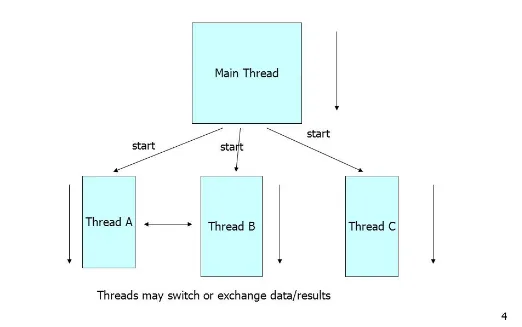
Illustration of parallel programming, taken from the internet.
Note that parallel programming is different from asynchronous programming. In parallel programming, several threads run at the same time, while in asynchronous programming several tasks can run concurrently, but not necessarily at the same time.
Asynchronous Programming
Asynchronous programming is a programming paradigm that runs tasks concurrently, without waiting for one task to finish before starting another. In PHP, asynchronous programming can be done with the swoole extension, which lets you create asynchronous web servers in PHP.
But do you know what an asynchronous web server is?
An asynchronous web server is a server that can handle several requests at the same time without creating a new thread for each one. This makes the server more efficient and able to handle a large number of requests concurrently.
You may see the term “self-contained server” in some places, but the idea is the same: a server that can handle several requests at the same time without creating a new thread for each one.
Asynchronous Programming Example in PHP
use Swoole\Http\Server;
$server = new Server("0.0.0.0", 9501);

$server->on("start", function (Server $server) {
    echo "Server started at http://{$server->host}:{$server->port}\n";
});

$server->on("request", function ($request, $response) {
    $data = $request->rawContent();
    $response->end("Received data: $data");
});

$server->start();
In the example above, we use the swoole extension to create an asynchronous web server in PHP. The server listens on port 9501 and answers every request with a message containing the data it received.
This example is quite simplified, but it shows how asynchronous programming can be used in PHP. For more information about the swoole extension, see the official documentation.
Here is an image illustrating asynchronous programming:
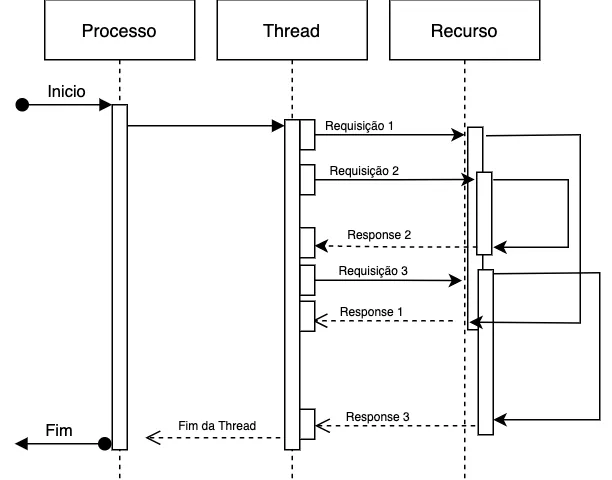
Illustration of asynchronous programming, taken from the internet.
Request Lifecycle in PHP-FPM
When a request is made to a PHP web server such as PHP-FPM, the server goes through several steps to process it and return a response to the client. The lifecycle of a request in PHP-FPM can be split into these steps:
- Receiving the Request: The web server (Apache, Nginx, etc.) receives the client's request and forwards it to PHP-FPM.
- Process Pool: PHP-FPM keeps a pool of preloaded PHP processes to handle requests. When a request arrives, PHP-FPM picks an available process to handle it.
- Autoload: PHP-FPM loads the files needed to process the request, including the classes and functions used in the PHP script. Classes and functions are loaded automatically by PHP, following the autoload rules defined in
composer.json. - Parsing and Compilation: PHP parses the PHP script and compiles the code into a form the PHP interpreter can execute.
- Script Execution: PHP executes the script, processing its instructions and generating the request's output.
- Building the Response: PHP-FPM builds the response, including the HTTP headers and the response body.
- Sending the Response: PHP-FPM sends the response to the web server, which forwards it back to the client.
- Ending the Process: After sending the response, the PHP process finishes and returns to the pool of processes available for new requests.
The lifecycle of a request in PHP-FPM can vary depending on the web server and PHP-FPM configuration. However, these steps are common to most PHP web servers.
Request Lifecycle in Swoole
When a request is made to an asynchronous PHP web server such as Swoole, the server goes through several steps to process it and return a response to the client. The lifecycle of a request in Swoole can be split into these steps:
The lifecycle starts when the Swoole server boots and sets up the PHP script that will handle requests. The Swoole server listens on a specific port and waits for requests to arrive.
At this point, the server already has autoload configured, the required classes and functions are already loaded, and the PHP script is ready to handle requests.
- Receiving the Request: When a request reaches the Swoole server, the server receives it and passes it to the PHP script configured to handle it.
- Processing the Request: The PHP script processes the request, running the instructions needed to generate the response.
- Parsing and Compilation: PHP parses the PHP script and compiles the code into a form the PHP interpreter can execute.
- Script Execution: PHP executes the script, processing its instructions and generating the request's output.
- Building the Response: The PHP script builds the response, including the HTTP headers and the response body.
- Sending the Response: The Swoole server sends the response to the client, ending the request's lifecycle.
At that point, the Swoole server is ready for new requests, keeping a pool of PHP processes available to handle them asynchronously.
The difference between the request lifecycle in PHP-FPM and in Swoole lies in how the PHP server boots and how requests are processed. In PHP-FPM, each PHP process is set up to handle one request at a time, while in Swoole the PHP server is set up to handle many requests asynchronously.
Conclusion
In this article, we explored using PHP for parallel and asynchronous programming. Parallel and asynchronous programming are techniques that can improve an application's performance and handle a large number of requests efficiently.
There are no hard rules, and parallel or asynchronous programming is not always the best solution to a problem. Still, it is always good to know the different techniques available and when to use them well.
I hope this article was useful and that you learned something new about parallel and asynchronous programming in PHP. In the future, I hope to write a more detailed article about each of these techniques, with more complex examples.
If you have any questions, corrections or suggestions, feel free to reach out. Thanks for reading this far!
References
- PHP Parallel Extension
- PHP pthreads Extension
- Swoole Extension
- PHP-FPM
- PHP Autoload
- PHP Composer
- PHP PSR
- FastCGI
Comments